










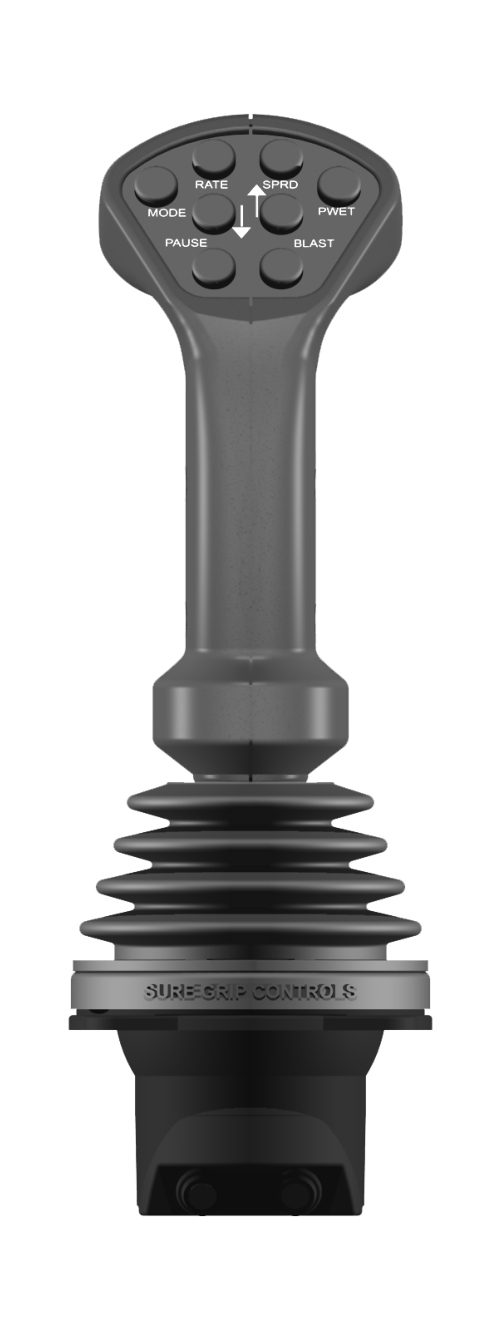
The
Joystick
affords
the
operator
full
control
of
the
system
with
8
Face
Buttons
and
a
two
way
Trigger
for
complete system operation with one hand.
MODE
Selects
the
Joystick
Mode
by
cycling
through
the
installed
equipment
such
as
Front-
Plow,
Hoist
and
Right Wing.
RATE
pops
up
a
large
red
RATE
text
label
on
the
screen
and
the
operator
can
adjust
the
rate
up
or
down
using
the
Up
and
Down
Arrows.
Holding
the
RATE
Button
down
for
2
seconds
pops
up
a
large
red
MATERIAL
text
label on the screen and the operator can select different material types.
SPRD
pops
up
a
large
red
SPREAD
text
label
on
the
screen
and
the
operator
can
adjust
the
spread
width
using
the Up and Down Arrows.
PWET
pops
up
a
large
red
PREWET
text
label
on
the
screen
and
the
operator
can
adjust
the
Pre-Wet
rate
usung the Up and Down Arrows.
PAUSE alternates between Application Mode and Paused conditions
BLAST
puts
the
output
at
the
Maximum
Programmed
Output.
If
the
truck
is
stationary
BLAST
will
enter
the
Intersection Blast mode which will cause a timed blast across an intersection when the truck starts moving.
Joystick Module (Joy)
Click Image to Enlarge







The
Joystick
affords
the
operator
full
control
of
the
system
with
8
Face
Buttons
and
a
two
way
Trigger
for
complete
system
operation
with
one
hand.
MODE
Selects
the
Joystick
Mode
by
cycling
through
the
installed
equipment
such
as
Front-
Plow,
Hoist and Right Wing.
RATE
pops
up
a
large
red
RATE
text
label
on
the
screen
and
the
operator
can
adjust
the
rate
up
or
down
using
the
Up
and
Down
Arrows.
Holding
the
RATE
Button
down
for
2
seconds
pops
up
a
large
red
MATERIAL
text
label
on
the
screen
and
the
operator
can
select
different material types.
Joystick Module (Joy)
Click Image to Enlarge